
Technical configuration
Data is exchanged between your system and Shippit using SFTP (secure file transfer protocol) connections. Shippit sets up and maintains a secure FTP server on your behalf. During the kick off process, you are provided with a username and password to use to access the server.
CSV schema
The CSV files you receive for orders follow this schema:
| Header | Description | Example |
|---|---|---|
Sender company name | Merchant name | Acme Pty Ltd |
Sender name | Contact person from the merchant | Jane Smith |
Sender email | Contact email provided by the merchant | jane.smith@acme.com |
Sender contact number | Contact phone number provided by the merchant | +61 2 1234 5678 |
Sender address | Merchant address (255 characters max). This header ends with a space | 123 Example St |
Sender suburb | Merchant suburb | Sydney |
Sender postcode | Merchant postcode (4 characters max) | 2000 |
Sender state code | Merchant state code (3 characters max) | NSW |
Sender country code | Merchant country code (2 characters max) | AU |
Receiver company name | Receiver company name | Widgets Inc |
Receiver name | Receiver name | John Doe |
Receiver email | Contact email provided by the receiver | john.doe@widgets.com |
Receiver contact number | Contact phone number provided by the receiver | +61 3 8765 4321 |
Receiver address line 1 | The first line of the receiver address (255 characters max) | 456 Sample Ave |
Receiver address line 2 | The second line of the receiver address (255 characters max) | Apartment 1 |
Receiver suburb | Receiver suburb | Melbourne |
Receiver postcode | Receiver postcode (4 characters max) | 3000 |
Receiver state code | Receiver state code (3 characters max) | VIC |
Receiver country code | Receiver country code (2 characters max) | AU |
Consignment number | Consignment identifier in GS1 GINC format. 30 characters, always starting with 401 | 401935350000000000000003488492 |
Account number | Identifier of the merchant’s account with the carrier | ACME12345 |
Authority to Leave | 1 when the package has authority to leave, empty otherwise | 1 |
Product code | Selection of service surfaced from quoting | EXPRESS |
Pickup instructions | Instructions for the carrier to follow during pickup | Collect from loading dock |
Delivery instructions | Instructions for the carrier to follow during delivery | Leave at front door if unattended |
Package label number | Package identifier in GS1 SSCC format | 00312345678901234567 |
Package weight kg | Package dead weight in kg | 2.5 |
Package length cm | Package length in cm | 30 |
Package depth cm | Package depth in cm | 10 |
Package width cm | Package width in cm | 20 |
Retailer invoice | Primary field used by merchants as their own internal identifier for this consignment | INV-10001 |
Retailer reference | Secondary field used by merchants as their own internal identifier for this consignment | REF-20002 |
Booked at | The time Shippit generated the file, in ISO 8601 UTC with milliseconds | 2025-06-20T16:00:00.000Z |
For more information about the CSV format, see the Carrier operations guide.
SFTP connection
Bookings and tracking use the same SFTP server, with one set of credentials. Shippit shares the connection details with you separately.
Shippit places new booking files in your booking directory. Upload tracking files to your tracking directory. Shippit sets up both directories with your account.
The tracking directory only applies if you send tracking updates by CSV.
The directory structure is configured when your account is set up, so the exact directory could be different depending on your configuration.
Configuring your shipping labels
Shippit generates carrier-compliant shipping labels for merchants. The label uses your name and logo, along with the sender and receiver details.
The label looks like this:
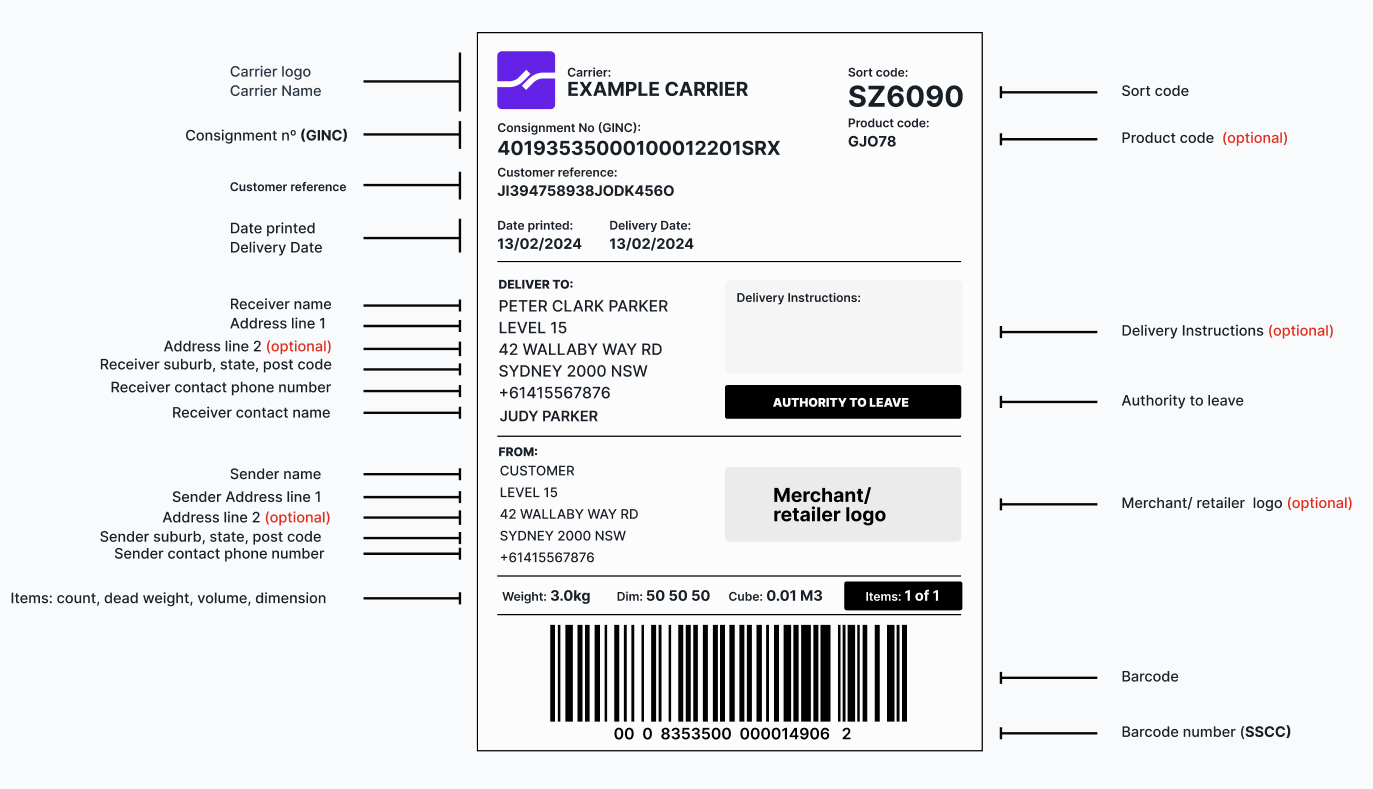
These fields are always printed:
- Carrier logo and name
- Product code
- Consignment number (GINC)
- Customer reference
- Date printed
- Deliver to and From blocks
- Merchant logo
- Delivery instructions panel, empty when there are no instructions
- Article weight, dimensions, cube, and item count
- Barcode and SSCC
These fields only appear when they apply:
- Sort code
- Delivery date
- Authority to leave bar
The merchant logo block is always filled. If the merchant has no logo, the Shippit logo prints instead.
Labels are A6. A consignment produces one page per article, each with its own SSCC barcode. The item count on each page shows its position, for example Items: 2 of 3.